Where an agent loop runs, how it fails, and how to make a session durable
At Tensorfuse we build infrastructure for containers and the machines that run them, so when coding agents started working for hours on remote machines, the question I kept asking was a practical one: when one of the machines involved disappears halfway through a task, which parts of the work survive, and which parts have to be done again?
A concrete task makes the question precise, so suppose you ask Codex, OpenAI’s coding agent, to move a web service from version 1 to version 2 of Pydantic, a Python library that checks that incoming data has the expected fields and types, and to keep working until the test suite passes. The task runs for two hours, issues a few hundred commands, and edits dozens of files, and somewhere in the second hour the provider that hosts the machine running those commands shuts that machine down because it reached a time limit. What happens next depends on where each part of the agent was running, and this essay works through the answer in order: the parts of the loop and where each one is hosted, the ways each part fails, the kinds of sandboxes and their failures, the durable execution systems that solved the same problem for payments and infrastructure long before language models, and a step-by-step design for a durable Codex session on Temporal.
What happens during one pass of the agent loop?
A language model is a program that reads a sequence of text and produces the text that should come next. Companies such as OpenAI and Anthropic run their models on their own servers and sell access through an API, which is a documented set of web requests that another program can send, and this essay calls such a company the inference provider, because running a model to produce output is called inference. A model reads text in units called tokens, which are fragments of a few characters each, and the largest number of tokens it accepts in one request is called its context window.
The agent loop is the cycle that turns a model into an agent that can change a codebase. A program sends the model your request together with a list of actions the model is allowed to ask for, and the model replies either with a message for you or with a tool call, which is a structured request such as “run pytest tests/test_models.py” or “replace lines 40 to 52 of models.py with this text”. The program carries out the tool call, appends the result to the conversation, and sends the longer conversation back to the model, and the cycle repeats until the model replies with a message for you.
In the Pydantic migration, the first pass reads the dependency file, the second runs the tests to see what breaks, and a pass in the second hour renames a validator method whose name changed between the two versions. The model computes each reply from the whole conversation so far, whether the harness resends that conversation with every request or sends the new items along with a reference to the previous response, and so the conversation the model reads grows with every command until it approaches the context window.
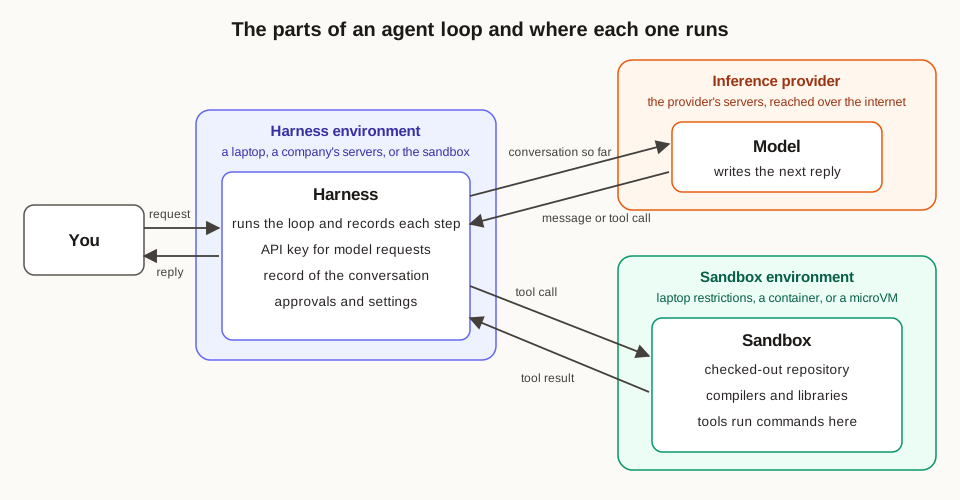
Which parts make up an agent, and where does each one run?
The harness is the program that runs the loop, which means that it builds each request to the model, reads the tool calls in each reply, decides whether a call needs your approval, carries the call out or sends it to the place where it should run, records every step, and shortens the conversation when it approaches the context window. The Codex CLI, the Codex web product, Claude Code, and the agent inside Cursor are all harnesses built around models.
A tool is one named action that the harness offers the model, described by a name, a sentence about what it does, and the list of inputs it accepts. The common tools in a coding agent run a shell command, read a file, apply an edit, or call an MCP server, which is a separate program that offers more tools through the Model Context Protocol, a standard format for describing and calling tools.
A sandbox is an isolated place where the commands produced by tool calls run. It limits which files a command can read and write, which network addresses the command can reach, and how much memory and processor time it can use, so that a mistaken or malicious command damages the sandbox and leaves the rest of the machine intact.
The harness environment is the machine, the operating system account, and the network location where the harness process runs, together with everything that process can reach, which includes the API key that pays for model requests, the record of the conversation, the settings, and credentials for services such as GitHub. The sandbox environment is the machine or isolated space where the commands run, together with everything those commands can reach, which includes the checked-out repository, the installed compilers and libraries, the environment variables, which are named settings that each process receives when it starts, and whatever network access the sandbox allows.
The model runs on the inference provider’s servers, and every harness reaches it over the internet. The harness runs in one of three places, and the first is your laptop, where the Codex CLI and Claude Code run as ordinary processes under your own user account. The second is a company’s servers, which is where Cursor’s cloud agents run their loop, and Cursor wrote in a June 2026 post about building cloud agents that the loop runs on Temporal, a system that records each step of a long-running program so that the program can continue after a crash, and runs apart from the virtual machine that holds the code, where a virtual machine is a complete computer simulated in software on a physical server. The third is the sandbox itself, which is where Codex Web runs its harness, inside a container that holds your repository, where a container is a group of processes that the operating system gives a private view of files, processes, and network. OpenAI’s post about the Codex App Server says that a worker, which is a program on OpenAI’s servers, prepares a container with the checked-out workspace, starts the harness program inside it, and keeps a long-lived connection to that program open while the browser receives the task’s events from OpenAI’s servers.
Tools run wherever their work has to happen, so shell commands and file edits run in the sandbox environment, where the repository is. MCP servers run wherever their operator placed them, and Cursor’s documentation says that cloud agents reach MCP servers that speak HTTP, the protocol that web requests use, through Cursor’s servers, which keeps those servers’ secrets on Cursor’s side, while MCP servers that run as local programs start inside the agent’s virtual machine along with their configuration.
The sandbox runs in one of two places, and on a laptop it is a set of operating system restrictions attached to each command that the harness starts, which the Codex CLI applies with Seatbelt, the sandboxing system built into macOS, and with bubblewrap, a Linux program that starts a process inside a restricted view of the system. In the cloud, the sandbox is a separate machine: Cursor runs each cloud agent in a Firecracker microVM, which is a small virtual machine with its own kernel, the part of the operating system that manages memory, files, and processes, inside an Amazon Web Services account that is separate from the rest of Cursor’s production systems, and Codex cloud creates a container for each task from a prepared image called universal, where an image is the saved set of files that every new container starts from.
What does it cost to put the harness inside the sandbox environment?
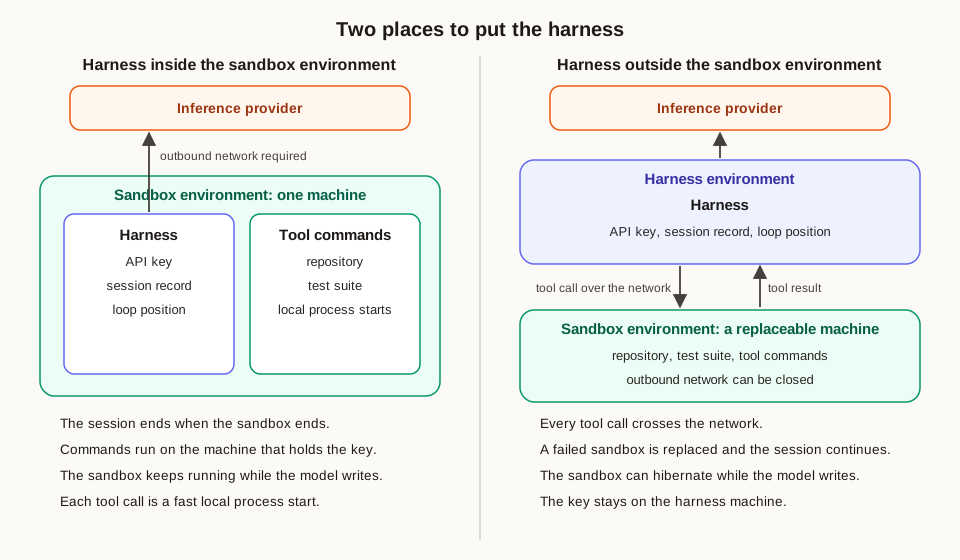
When the harness runs inside the sandbox environment, the harness process and the commands it starts share one machine, one disk, and one network configuration. Codex Web uses this layout, and OpenAI’s App Server post gives the reason, which is that the same harness program then runs on the desktop and on the web. The simplicity is real, because every tool call becomes a local process start that takes milliseconds, the harness reads files straight from the local disk, and the program that runs on a laptop is the same program that runs in the cloud.
The first cost is that the session ends when the sandbox ends, because the conversation, the plan, and the position in the loop exist in the harness’s memory and on the sandbox’s disk, so a sandbox that reaches its time limit, runs out of memory, or is reclaimed by its provider takes the session with it, and recovery means starting a fresh harness from whatever copy of the conversation was saved somewhere else. In OpenAI’s design for Codex Web, the worker that starts the harness also maintains the connection to it, the Codex backend streams the task events that the worker produces to the browser, and OpenAI says that thread history is persisted so that clients can reconnect.
The second cost is exposure of secrets, because the harness needs an API key or a token for every model request, so the key sits in the harness’s environment variables, configuration files, or memory, and every command the model asks for runs on the same machine as that key. A command produced by prompt injection, which is text planted in a file or a web page that instructs the model to act against its user’s intent, can read the key and send it to an outside server. Codex cloud reduces this exposure for the secrets you configure by giving them only to setup scripts, which are the scripts that install dependencies before the model starts working, and its documentation says that secrets are removed before the agent phase, the part of the task in which the model works, begins.
The third cost is open network access, because the harness has to reach the inference provider, so the sandbox has to allow outbound connections to at least that address, and every allowed outbound connection is a path along which data can leave the sandbox. A sandbox whose harness runs elsewhere can have its outbound network switched off entirely.
The fourth cost is money spent on waiting, because a model request for a hard step can take minutes and a question for the user can wait overnight, and during both waits the harness process has to keep running, which keeps the whole sandbox with its processors, memory, and disk running while the provider charges for every minute.
The fifth cost is competition for resources, because the harness shares memory with the test suite, so a test run that exhausts the sandbox’s memory limit can lead the operating system to stop the harness along with the tests, and a cleanup command such as pkill python stops a harness that happens to be written in Python along with the stray test processes it was meant to remove.
What does it cost to put the harness outside the sandbox environment?
When the harness runs outside the sandbox environment, either as a process on a laptop that wraps each command in restrictions or as a service on a company’s servers, every tool call becomes a message sent to a separate process or a separate machine. Cursor’s cloud agents use this layout, and so does Cursor’s option for running cloud agents on your own hardware, where Cursor’s documentation says that Cursor runs the agent loop, inference, and planning while the worker on your machine performs the file edits and terminal commands.
The first cost is latency, the delay before a response arrives, on every tool call, because each command, file read, and file write travels over the network to the sandbox and back, and an agent that reads two hundred small files during one turn pays that round trip two hundred times, which pushes the harness to batch reads together and to keep copies of files it has already read.
The second cost is the engineering of a remote execution interface, which is an API that starts processes, sends back their output as it is produced, sends input to interactive programs, reads and writes files, reports exit codes, which are the numbers a finished command returns to report success or failure, and enforces time limits. Cursor’s self-hosted workers show one version of this interface, in which the worker opens a long-lived outbound encrypted web connection to Cursor’s servers and Cursor sends tool calls over that connection, so the worker’s network accepts zero incoming connections.
The third cost is keeping two pieces of state in agreement, because the harness holds the conversation and the sandbox holds the files, so after any failure the harness has to find the right sandbox again, confirm that its files match the last recorded step, and rebuild the sandbox from a saved copy when they differ.
The fourth cost is the machinery that starts, stops, and restores sandboxes while a session continues. Once a sandbox can be stopped and replaced while the session continues, someone has to write the code that hibernates idle sandboxes, which means saving their memory to disk and stopping them, restores them for the next message, and starts new ones quickly, and Cursor’s post lists the pieces it built: methods to hibernate and resume agent virtual machines between messages, pipelines to checkpoint, restore, and fork virtual machine images, which are saved copies of a machine’s disk, and a supply of machines that are already running, so that a new agent starts as a copy of a running machine and begins work almost immediately.
Which placement makes sense, and why?
For an agent that runs longer than a few minutes on a remote machine, the harness belongs outside the sandbox environment. The reasoning follows from what each side holds: the sandbox runs code that a model wrote from instructions that can include injected text, it is the part most likely to hit a limit and stop, and its provider charges for every minute it runs, while the harness is a small program that holds the secrets and the record of the session. Placing the harness outside lets the sandbox run with its outbound network closed, lets a failed sandbox be replaced while the session continues, and lets the sandbox hibernate while the model generates a reply or the user sleeps. The cost is the latency of remote tool calls, the remote execution interface, and the lifecycle machinery, and a platform builds those pieces once in its own code while every session that runs afterward benefits from them.
OpenAI and Cursor both reached this conclusion in public, and OpenAI’s guide to sandboxes in the Agents SDK, OpenAI’s software development kit for building agents, describes the harness as the side that owns the agent loop, the model calls, the routing of tool calls, the approvals, and the saved state of a run, and it says that running the harness inside the sandbox can be convenient for prototypes while it places the program that makes decisions in the same place as the commands the model directs. Cursor reports that its loop on Temporal survives interruptions in inference, the hibernation and resumption of machines, and runs that stretch across days or even weeks.
On a laptop, the common harnesses already follow this layout at the level of processes. The Codex CLI runs as your own process and applies Seatbelt or bubblewrap to each command it starts, so the harness sits outside the restrictions and the commands sit inside them, and Claude Code does the same with Seatbelt on macOS and bubblewrap on Linux, while Cursor’s desktop agent uses Seatbelt on macOS and Landlock with seccomp on Linux. The inside placement remains a sound choice for short tasks where one sandbox’s lifetime comfortably covers the whole session, and Codex Web accepts its costs in exchange for running one harness program everywhere.
How does each part of the loop fail?
Failures in an agent come from five places, which are the inference provider, the tools, the sandbox, the harness environment, and the execution of the harness itself, and each place produces a different kind of error that calls for a different response.
The inference provider fails in ways its documentation lists, and OpenAI’s API returns status code 429 when a caller sends requests too quickly, with the code slow_down when traffic rises sharply, and 503 when its servers are overloaded, while Anthropic’s API returns 529 with the type overloaded_error under heavy load and 500 for internal errors, where a status code is the three-digit number at the start of every web response that reports whether the request succeeded. Anthropic’s documentation adds a detail that matters to anyone writing a harness: when a response is streamed, meaning the text arrives in small pieces as the model produces it, an error can arrive in the middle of the stream after the server has already sent a success status. Providers also have outages that outlast any series of retries, and on December 11, 2024, OpenAI’s API and ChatGPT went down for 4 hours and 22 minutes after a new telemetry service, which collects operational metrics, overloaded the control planes of its Kubernetes clusters, which are the services that manage where programs run, and broke DNS, the system that turns service names into network addresses, which also locked engineers out of the control planes they needed to repair the problem.
Harnesses retry the errors that belong to the moment, and the Codex configuration reference lists four retries for failed HTTP requests to the provider, five retries for interrupted streams, and a five-minute limit on how long a stream may stay silent before Codex treats it as broken. A request that is larger than the context window fails the same way on every attempt, so the harness has to shorten the conversation before it sends the request again.
Tools fail before, during, and after they run, and before a tool runs, the model can name a tool that is missing from the harness’s list or pass inputs in the wrong format, such as a single path where the tool expects a list of paths. During a run, a command can wait forever for input, such as a test runner that stops to ask a question, which is why harnesses put a time limit on every command. After a run, the output itself can mislead the model, because a test suite that prints ten thousand lines can report its first failure on line two hundred, and a harness that keeps the last hundred lines shows the model a clean ending.
The sandbox fails when a limit is reached, when the machine under it goes away, or when the agent damages it, and the section after this one covers those failures in detail. The harness environment fails when the machine under the harness goes away, which happens when a laptop goes to sleep, when a deployment restarts a server with a new version of the code, or when a cloud provider moves a server for maintenance, and anything the harness held in memory alone, such as a half-received model response or a pending approval, disappears with the process.
The execution of the harness fails in patterns that are now well documented, because every team that runs long agent sessions reports the same ones. The first pattern is running out of context, because every tool result makes the conversation longer, and when it nears the context window the harness compacts it, which means replacing older turns with a shorter version of the conversation that the model produces, and Codex exposes this as the model_auto_compact_token_limit setting, the token count at which it compacts automatically. Compaction discards detail by design, and Anthropic’s guide to context engineering describes a gradual effect it calls context rot, in which a model’s ability to recall information from its context falls as the number of tokens in the context grows.
The second pattern appears in tasks that span many context windows, and Anthropic’s post on harnesses for long-running agents reports that its agent tried to build an entire application in one attempt, ran out of context in the middle of a feature and left the next session to work out a half-implemented feature from the code alone, looked at existing progress in later sessions and declared the job done, and marked features as complete before testing them properly. Its fixes were a feature list kept in a JSON file, which is a common text format for structured data, a progress file that records what each session did, a commit to git, the version control system that records saved versions of a codebase called commits, after each piece of work, and end-to-end tests run through browser automation before a feature counted as finished.
The third pattern is a loop in which the agent repeats a failing action, such as rerunning the same failing test against the same code, until it exhausts its budget. Harnesses cap the number of passes for this reason, and the OpenAI Agents SDK stops a run after max_turns passes, which its source code sets to 10 by default, and raises a MaxTurnsExceeded exception.
The fourth pattern is failure caused by the design of the tools, and the SWE-agent paper from Princeton measured this directly: adding a linter that rejected edits with syntax errors raised the share of solved tasks from 15.0 to 18.0 percent, and showing the model a file 100 lines at a time solved 18.0 percent of tasks where showing the whole file solved 12.7 percent.
The fifth pattern is prompt injection, and the Codex documentation on internet access gives an example in which text the agent reads tells it to run a command that pipes the output of git show HEAD, which prints the latest commit, into curl, a program that sends web requests, posting it to httpbin.org, a public test server, which would send the latest commit to an outside machine.
The sixth pattern is a repeated side effect, in which a harness that restarts after a crash and runs the last step again can run a command twice, push the same commit twice, or open two pull requests, where a pull request is a proposed change submitted for review on a service such as GitHub, because its record ends before the first attempt reported its result. When several agents cooperate, the failure list grows further, and researchers at Berkeley catalogued 14 distinct failure modes in such systems, grouped into problems of system design, misalignment between agents, and verification of the task.
What kinds of sandboxes are there?
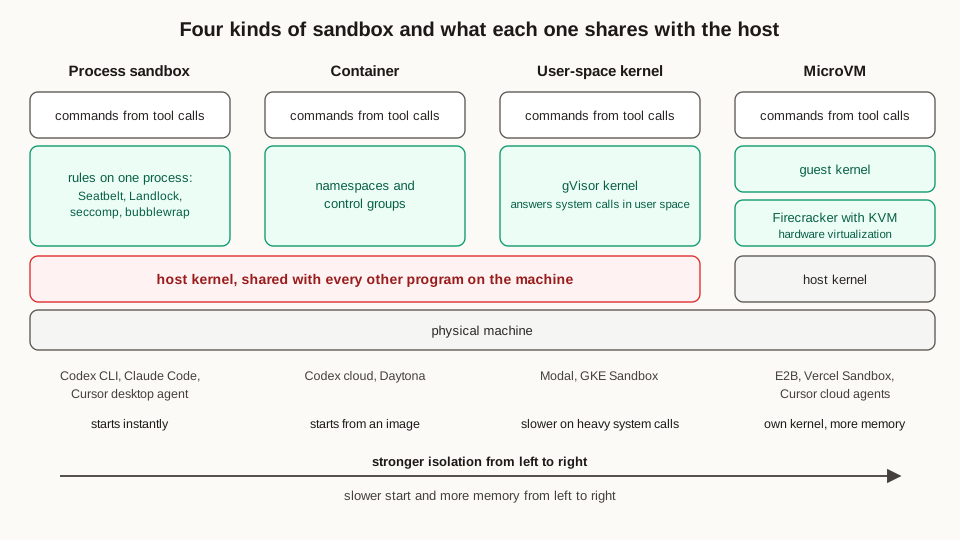
The kinds of sandboxes differ in what they share with the host machine, and the most important shared component is the kernel, which is the part of the operating system that manages memory, files, processes, and devices for every program on the machine. A program asks the kernel for these services through system calls, and the strength of a sandbox depends on which layer handles those calls.
A process sandbox applies operating system rules to one process and the processes it starts, on the same kernel as everything else. On macOS, Seatbelt applies a profile that lists what a process may read, write, and connect to, and Apple marks the sandbox-exec command that applies these profiles as deprecated while it still ships with current macOS. On Linux, Landlock, added in kernel version 5.13, lets an ordinary process restrict its own file access, seccomp filters which system calls a process may make, and bubblewrap combines Linux namespaces, which give a process its own view of the filesystem, process list, and network, to start a process inside a restricted view of the system. Process sandboxes start instantly and add almost zero overhead, which is why the Codex CLI, Claude Code, and Cursor’s desktop agent all use them, and their weakness is the shared kernel, because a flaw in the kernel can let a command escape. Anthropic reported that adding this kind of sandbox to Claude Code reduced permission prompts by 84 percent in its internal use, because commands that stay inside the sandbox’s rules can run with automatic approval.
A container gives a group of processes its own view of the filesystem, the process list, and the network through Linux namespaces, and caps their memory and processor use through control groups, which are the kernel’s mechanism for resource limits. Containers start quickly from a prepared image and are the default sandbox in Codex cloud and in Daytona, a hosted sandbox service, and they share the host kernel, which leads providers that run many customers’ code on one server to add a further layer between the container and the host.
A user-space kernel places a second kernel, written as an ordinary program, between the sandboxed code and the host kernel. gVisor, a Google project, implements the Linux system call interface in its own process, so the sandboxed program’s system calls reach gVisor first and the host kernel handles a much smaller set of requests from gVisor itself. Google Kubernetes Engine’s sandbox feature uses gVisor, and Modal, a cloud platform that offers sandboxes, runs them under gVisor by default. gVisor’s documentation states the trade-off directly, which is that programs making many system calls run slower and that some system calls and some files under /proc and /sys are missing, so a few programs behave differently than they do on an ordinary Linux machine.
A microVM is a virtual machine reduced to the few devices a server workload needs, running its own guest kernel, meaning a kernel inside the virtual machine, on hardware virtualization, which is the set of processor features that let one physical machine run several isolated operating systems. Firecracker, built at Amazon Web Services for Lambda and Fargate, its services that run customers’ functions and containers, is a virtual machine monitor, the program that creates and runs virtual machines, and it uses KVM, the virtualization feature of the Linux kernel, to run microVMs, and its specification states that a microVM reaches the start of its first user process within 125 milliseconds of the start request and that Firecracker’s own threads use at most 5 MiB of memory. E2B and Vercel Sandbox, two hosted sandbox services, run every sandbox as a Firecracker microVM, and Cursor runs its cloud agents on Firecracker-based infrastructure. A microVM gives each sandbox its own kernel, so a kernel flaw exploited inside one guest stays inside that guest, and the cost is a slower start and more memory than a container needs.
A full virtual machine, such as a cloud server rented by the hour, provides the same kernel-level isolation with a complete set of devices and a longer boot, and it suits sandboxes that need a whole operating system, such as agents that operate a graphical desktop.
What happens when a sandbox fails, and why do sandboxes fail?
When a sandbox fails, four things happen at once, and the first is that the running command stops while its tool call either returns an error or stays silent until the harness’s own time limit expires, which is often the first moment the harness learns that anything went wrong. Every file written since the last saved copy disappears, which in the Pydantic migration means every edit made since the last commit that was pushed out of the sandbox. Every background process disappears as well, including a database that the tests needed or a development server that the agent started, and when the harness runs inside the sandbox the session disappears with them, while a harness that runs outside is left holding a conversation that describes files the sandbox has lost.
Sandboxes fail for reasons that fall into four groups, and the first group is the set of limits that each provider imposes. E2B lets a sandbox run continuously for up to one hour on its Hobby plan and 24 hours on its Pro plan, stops it when the timeout expires or pauses it when the caller requested a pause, and keeps paused sandboxes indefinitely. Modal stops a sandbox after five minutes by default and after 24 hours at most, Vercel Sandbox allows sessions of 45 minutes or 24 hours depending on the plan, and Cloudflare’s Sandbox SDK puts an idle sandbox to sleep after ten minutes by default and deletes every file that was left out of a backup to R2, Cloudflare’s file storage service, or a storage bucket attached to the sandbox as a directory.
The second group is exhaustion of resources inside the sandbox, which happens when the processes in a Linux container exceed the memory limit set by the control group’s memory.max value and the kernel’s out-of-memory handler stops a process in that group, so a test suite that loads large test datasets into memory or a compiler that runs many jobs at once can trigger it, while a full disk or a cap on the number of processes produces similar failures.
The third group is failure of the infrastructure underneath the sandbox: the host server can fail or be taken down for maintenance, the provider’s API can be down at the moment the harness asks for a new sandbox, and the image a sandbox starts from can fail to download, for example when Docker Hub, the public registry that stores container images, reaches its limit of 100 image pulls per six hours for anonymous users.
The fourth group is damage done by the agent itself: the agent can delete files it needs, remove a system package, fill the disk with build caches, or stop a background service the tests depend on, and the sandbox then keeps running in a state that blocks the task. A related failure is a sandbox that fails to start at all, and Claude Code’s documentation says that when its sandbox fails to start, Claude Code by default shows a warning and runs commands outside the sandbox, and it exits with an error when the sandbox.failIfUnavailable setting is turned on.
What problem did durable execution solve before AI?
The failures above share one structure, and that structure is older than language models: a program is partway through a sequence of steps that change things in other systems, the program stops, and something has to decide which steps already happened and which still need to run. Payment systems, order pipelines, and infrastructure tools met this problem long before agents did.
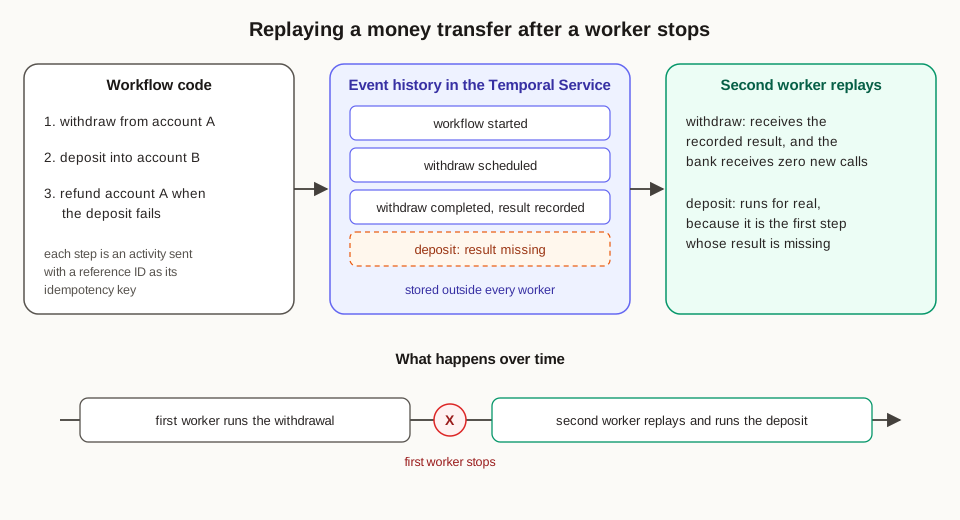
Temporal’s introductory tutorial uses a money transfer to show the problem, with a program that withdraws an amount from one account, deposits it into another, and refunds the first account when the deposit fails. When the process stops after the withdrawal and before the deposit, the money has left one account and has yet to arrive in the other, and restarting the program from the top would withdraw it a second time.
Before durable execution platforms existed, teams handled this with a database table that recorded the current step, a queue of pending work, scheduled jobs that searched for stuck records, and retry logic in every service, and each of those pieces had its own failure cases at exactly the moments when a process stopped. Durable execution replaces that collection with one idea, which is to write the sequence as ordinary code and let a platform record the result of every step, so that the code can continue from the last recorded step on any machine.
What does a durable execution platform guarantee?
In Temporal, the sequence is a workflow, which is a function written in an ordinary language such as Go, Python, TypeScript, or Java, and each step that touches the outside world is an activity, which is a separate function that performs one action, such as calling a bank’s API. Your code runs in workers, which are processes you operate that ask the Temporal Service for work from a named task queue, run the matching code, and report the results. The Temporal Service, which you can run yourself or rent as Temporal Cloud, stores an event history for every workflow execution, which is an ordered log of every step that was scheduled, started, completed, or failed, together with the inputs and results of each step.
When a worker stops, another worker continues the workflow by replaying it, which means running the workflow function from the beginning while the Temporal Service supplies the recorded result of every activity that already completed. In the money transfer, the replaying worker reaches the withdrawal, receives its recorded result from the event history and leaves the bank alone, and then schedules the deposit, which is the first step whose result is missing from the history.
Temporal’s documentation states the guarantees in specific terms, and the first is that workflow code runs effectively once and to completion, whether the workflow lasts seconds or years. Activities run at least once, which means that a worker that finishes an activity and stops before reporting the result causes the activity to run again, and Temporal records the activity as completed exactly once even when it ran more than once. Failed activities are retried automatically under a default policy that waits one second before the first retry, doubles the wait after each attempt up to a maximum of 100 seconds, and keeps retrying until the activity succeeds or raises an error of a type that you listed as final, while workflows themselves are retried only when you configure a retry policy for them.
Every activity also declares a time limit, either on a single attempt, called Start-To-Close, or on all attempts together, called Schedule-To-Close. A long activity can send heartbeats, which are small messages from the worker to the Temporal Service reporting that the activity is still running, and when heartbeats stop arriving within the heartbeat timeout, Temporal fails that attempt and schedules a retry. A heartbeat can carry progress details, such as the number of records processed so far, and the next attempt receives those details and can continue from the last reported point.
Timers are stored by the Temporal Service, so a workflow can sleep for thirty days while every worker is shut down, and the timer still fires and resumes the workflow once a worker returns. Signals are messages that outside programs send to a running workflow, and updates are messages that also return a result to the sender, so a workflow that waits for a signal, such as a human approval, keeps its place in the Temporal Service and resumes on any worker once the signal arrives.
Replay places one rule on workflow code, which Temporal calls determinism: given the same history, the code has to make the same calls in the same order. Reading the system clock, generating a random number, or calling a network service directly inside workflow code would produce different values on replay, so workflow code uses the SDK’s replacements, such as workflow.now() in Python, and places every network call inside an activity.
Because activities can run more than once, each one should be idempotent, which means that running it twice has the same effect as running it once. The standard technique is an idempotency key, which is a unique identifier sent with a request so that the receiving system recognizes a repeat and returns the first result, and Temporal suggests combining the workflow’s run ID with the activity’s ID, which stay the same across retries of one activity. Temporal’s money transfer templates in Go and Python send a reference ID with the suffixes -withdrawal, -deposit, and -refund for exactly this purpose.
How do developers build on a durable execution platform?
Building on Temporal takes four pieces of code and one service: you write the workflow function, which sets the order of the steps and the decisions between them, and you write activity functions, each of which performs one action against the outside world and returns a result. You run workers, which register those functions and poll a task queue, and you can run as many workers as the load requires, because the durable state sits in the Temporal Service and any worker can pick up any step. You start workflows from a client with a workflow ID that you choose, and Temporal allows one open execution per workflow ID, which turns a duplicate start request into an error or a reference to the execution that is already running. The Temporal Service does the rest by storing histories, scheduling tasks, firing timers, and delivering signals, and even on Temporal Cloud your code runs on workers that you operate.
Two operational details matter for long workflows, and the first is that the event history of one execution is capped at 51,200 events or 50 MB, with warnings starting at 10,240 events or 10 MB, and each payload, meaning each input or result stored in the history, is capped at 2 MB, so a long workflow periodically calls continue-as-new, which closes the current execution and starts a new one with the same workflow ID, a fresh history, and whatever state the code passes forward. The second detail is versioning: when you change workflow code while executions are running, you mark the changed section with a patch, such as workflow.patched() in Python, so executions that started before the change replay along the old path and new executions take the new one.
Where was durable execution used before AI?
The idea has a long record in production, starting with Simple Workflow Service, which Amazon launched in February 2012 and which Temporal’s founders, Maxim Fateev and Samar Abbas, both worked on, and Samar Abbas later created the Durable Task Framework at Microsoft, which is now the foundation of Azure Durable Functions. The two founders then built Cadence at Uber, which Uber open-sourced in 2017 and which, by Uber’s count in 2023, ran more than 12 billion executions a month and powered more than 1,000 services. They left Uber in October 2019 to start Temporal, which began as a fork of Cadence, meaning a copy of the Cadence code that the new company developed separately.
Temporal’s early users applied it to the same kind of multi-step work, and Snap used it for asynchronous ads reports and for its continuous deployment pipeline, Coinbase ran multi-step cryptocurrency transactions on Cadence with compensating steps that undo earlier steps when a later one fails, Datadog turned its step-by-step manual procedures for database maintenance into workflows, and Checkr moved its background-check pipeline off a system of databases and queues built on Kafka, a system for passing messages between services. Netflix moved the cloud operations of Spinnaker, its deployment platform, onto Temporal and reported that the share of deployments failing because of temporary errors fell from 4 percent to 0.0001 percent.
How can each part of an agent be made durable?
An agent session is a sequence of steps with effects in other systems, which is the kind of program durable execution was built for, because each model call and each tool call is a step with an outside effect and each wait for a person is a wait for an outside event. The techniques differ for each part of the agent, because each part holds a different kind of state.
The session consists of the conversation, the tool calls in progress, the pending approvals, and the loop’s position, and it becomes durable when every step is written to a store outside the harness process before the harness acts on it. Codex already writes each session to a transcript file under ~/.codex/sessions and can continue it with codex resume or codex exec resume <SESSION_ID>, which lets the session survive the process while keeping it on one disk. The Codex App Server persists thread history so that clients can reconnect, Cursor moved conversation storage into an append-only store, which adds new records at the end and keeps existing records exactly as they were written, and that store sends updates to its web and desktop clients as they happen, and the OpenAI Agents SDK saves a paused run as a RunState object that can be resumed later, for example after a person approves a tool call.
A model call becomes durable when it runs as an activity with a retry policy and its completed response is recorded, so that replay returns the recorded response and the provider is paid once. Temporal’s integration with the OpenAI Agents SDK works this way: each model call runs as an activity with a default timeout of 60 seconds, the OpenAI client’s own retries are turned off so that Temporal’s retry policy governs every attempt, and the workflow records the attempt that succeeded. Streaming needs one extra step, because a person watching the stream sees the partial output of a failed attempt followed by the full output of the retry, and Temporal’s guidance is for the interface to clear its display when it receives a retry event.
A tool call becomes durable when it runs as an activity with a time limit, heartbeats for long commands, and an idempotency key built from the session ID and the tool call’s ID, so that a retried call can check whether the first attempt already finished. Actions with effects outside the sandbox need an explicit check before they act, such as looking for an existing pull request on the branch before opening a new one. Large outputs belong in files, and Cursor writes long tool outputs to files that the agent searches when it needs them, which in a Temporal design keeps the history small because the activity returns the exit code, the last lines of output, and the path of the full log.
The sandbox becomes durable in three ways that combine well, and the first is a snapshot, which is a saved copy of a sandbox’s disk and sometimes its memory at one moment: E2B saves both the filesystem and the memory when it pauses a sandbox, Modal offers filesystem, directory, and memory snapshots, Vercel Sandbox snapshots the filesystem and installed packages, Cloudflare’s Sandbox SDK backs up directories to R2 storage, and Cursor built pipelines that checkpoint, restore, and fork whole virtual machine images. The second is persistent storage, such as a bucket mounted into the sandbox, which keeps chosen directories after the sandbox itself is gone. The third is rebuilding the sandbox from its inputs, which are the base image, the repository at a known commit, and the setup script, and committing and pushing the agent’s work to a branch after every meaningful step turns the git remote into the checkpoint of record, which is the same technique Anthropic’s long-running harness relies on.
The harness process becomes durable by keeping every piece of state that matters in the event history, so that any worker can continue the loop after another worker stops, which is how Cursor’s loop survives the hibernation and resumption of machines. Waits for a person become durable as signals and timers, so an approval that arrives the next morning resumes the workflow on whichever worker is running at that moment. OpenAI’s Agents SDK makes the split between harness state and sandbox state explicit: when a run resumes, the runner uses a live sandbox session if the application passes one in, then the sandbox state saved inside the run’s state, then an explicitly stored session state, and otherwise creates a fresh sandbox, which a snapshot can fill with files.
What does Temporal offer an agent session?
Temporal offers five things that an agent session needs: an event history that records every model call and tool call with its result, automatic retries with backoff for errors that belong to the moment, time limits and heartbeats that detect a stalled command or a vanished sandbox, signals and durable timers for waits that last hours or days, and continue-as-new for sessions that outgrow one history.
It also offers a direct integration with the OpenAI Agents SDK, which became generally available for Python on March 23, 2026 and was published as its own package, temporalio-openai-agents, in September 2026. In that integration, model calls run as activities, plain function tools, which are tools written as ordinary functions that compute a result, run inside the workflow, and tools that read or write outside data run as activities through activity_as_tool, while support for the SDK’s sandbox agents is still marked as a pre-release feature. Cursor’s cloud agents show the scale at which this works, since Cursor reports that moving its agent loop to Temporal took its reliability past 99 percent and that Temporal now handles more than 50 million actions a day across more than 7 million workflows.
How would you build a durable Codex session on Temporal, step by step?
Codex is built to run next to the files it edits, because the CLI starts commands on the machine where it runs and Codex Web runs the same harness inside the task’s container. The practical design therefore keeps the Codex process inside the sandbox for the length of one turn, meaning one message from you and all the model calls and commands until Codex answers, and moves everything that has to outlive a sandbox into a Temporal workflow that runs outside it, namely the session ID, the saved transcript, the commit that holds the work, the sandbox ID, and the approvals. The workflow is the durable part of the harness, and each Codex turn is one activity inside it.
First, start one workflow per session and use the session’s name as the workflow ID, such as codex-pydantic-v2-migration, with the repository URL, the base branch, and your request as input. Temporal allows one open execution per workflow ID, so a second start request for the same session returns an error or the running execution and leaves you with exactly one session.
Second, create the sandbox in an activity called create_sandbox, which calls the sandbox provider’s API and labels the new sandbox with the workflow ID. The label makes the activity idempotent, because a retry first looks for a sandbox carrying that label and returns it, so a retry after a lost response reuses the sandbox that the first attempt created, and the activity returns the sandbox ID for the workflow to keep as state.
Third, prepare the workspace in an activity called prepare_workspace, which clones the repository, creates a branch such as agent/pydantic-v2, runs the project’s setup script, installs the Codex CLI, and writes a Codex configuration that sets the sandbox mode, which controls what commands may write and reach, and the approval policy, which controls when Codex asks before running a command. The model credential is the one secret Codex needs inside the sandbox, so keep it short-lived or route it through a proxy, which is a small server that holds the key and forwards Codex’s requests to OpenAI, and this is the approach OpenAI’s GitHub Action for Codex takes when it starts a Responses API proxy to reduce exposure of the API key.
Fourth, run each turn in an activity called run_codex_turn, which runs codex exec --json with your request for the first turn and codex exec resume <SESSION_ID> with your new message for every later turn. The --json flag makes Codex print one JSON event per line, including a thread.started event that carries the session ID, item events for each message and command, and a final turn.completed or turn.failed event, and the activity reads these events as they arrive and sends a heartbeat to Temporal every few seconds with the number of events seen so far. Give the activity a Start-To-Close timeout long enough for a real turn, such as two hours, and a heartbeat timeout of about one minute, so that a sandbox that vanishes in the middle of a turn is detected within a minute and the turn is retried.
Fifth, save a checkpoint after every turn in an activity called checkpoint, which commits every change in the sandbox to the work branch, pushes the branch to the remote repository, copies Codex’s transcript for the session from ~/.codex/sessions to object storage, which is a service that stores files by name, such as Amazon S3, and returns the commit’s identifier, called its SHA, together with the storage key. The workflow stores those two small values and leaves the large transcript in object storage, which keeps the event history far below its 50 MB limit and every payload below 2 MB.
Sixth, wait for your next message between turns as a signal called user_message, together with a timer that ends the session after a day of silence, and give each message an ID so that the workflow can discard a repeat, because Temporal’s documentation says that a signal can be delivered more than once. While the workflow waits, an activity can pause or delete the sandbox, because the pushed commit and the saved transcript hold everything needed to continue, and the wait itself uses zero worker resources because the Temporal Service stores the timer and the pending signal.
Seventh, rebuild before retrying when a turn fails because the sandbox is gone, which shows up as a missed heartbeat or an error from the sandbox provider. The workflow runs create_sandbox for a new sandbox, then a restore_workspace activity that clones the repository at the last pushed commit and copies the saved transcript back into ~/.codex/sessions, where codex exec resume looks sessions up by ID, and then runs run_codex_turn again with a message telling Codex that the workspace was restored to the last checkpoint commit and that any work after that commit has to be redone. Codex continues with its full conversation history, and the work lost is limited to the part of one turn that came after the last checkpoint.
Eighth, place every action with effects outside the sandbox behind an approval signal and an existence check. Before the workflow opens a pull request, it waits for an approve signal from you, and the open_pull_request activity first asks GitHub whether a pull request already exists for the branch and returns that pull request when it finds one, so a retry after a lost response still produces exactly one pull request.
Ninth, continue as new after a fixed number of turns, such as every fifty, passing the session ID, the latest commit SHA, the transcript’s storage key, and the sandbox ID into the new execution, so the session keeps its workflow ID and starts with a fresh history.
Tenth, delete the sandbox in a final cleanup activity when the session ends, whether it ended with a merged pull request, a cancellation, or a timeout, so that a finished session leaves zero machines running.
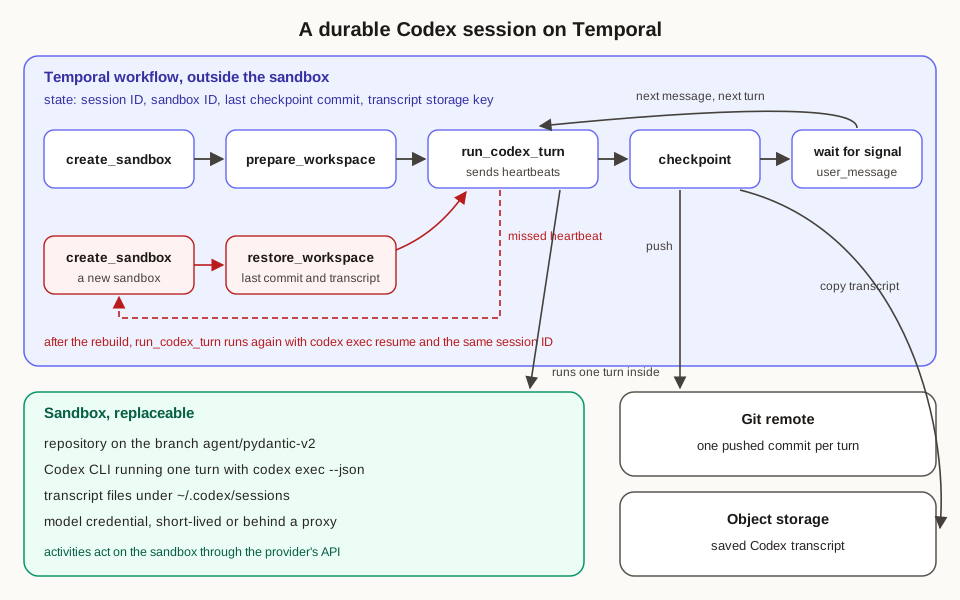
With these pieces in place, any worker can stop at any line of the workflow, and the next worker replays the history, so completed activities return their recorded results, the activity that was in progress runs again, and the session continues under the same workflow ID with the same Codex session ID. This design checkpoints once per turn, which suits Codex because Codex’s loop runs inside the sandbox. If you write your own loop or use the OpenAI Agents SDK, you can checkpoint at every step, with each model call and each command as its own activity, the conversation stored in the workflow’s state, and the harness running entirely outside the sandbox, which is the layout Temporal’s Agents SDK integration uses and the same placement of the loop that Cursor chose for its cloud agents.
The fastest way to see the difference is to cause the failure on purpose. Run codex exec inside a sandbox you created yourself, delete the sandbox in the middle of a turn, and check what remains, and you will find that the transcript and every edit since the last commit were on the sandbox’s disk and went with it. Then run the same task through the workflow above and delete the sandbox at the same moment, and you will see the workflow notice the missed heartbeat within a minute, build a new sandbox from the last pushed commit, restore the transcript, and resume the same Codex session where the last checkpoint left it.